Register or sign in
Use the onboarding site to register the church, select a plan, and create the first admin account. Returning users sign in through the dashboard.
This guide covers the church admin dashboard, member-facing church app, finance workflows, media publishing, events, pastoral care, app customization, imports, exports, settings, and platform administration.
The fastest path is to create the church account, confirm core settings, invite your team, add initial church data, then publish the member-facing app configuration.
Use the onboarding site to register the church, select a plan, and create the first admin account. Returning users sign in through the dashboard.
Open Settings and confirm church profile, contact details, branch structure, billing plan, email domain, map keys, YouTube integration, AI provider settings, and other integrations.
Open Users & Roles, create accounts for pastors, finance users, ministry staff, community managers, and branch teams. Assign the narrowest role that gives each person the access they need.
Add members, sermons, events, giving campaigns, publications, groups, announcements, prayer requests, and branch details manually or through Data Import.
Use App Designer, App Texts, App Images, and feature visibility controls to shape the mobile app. Preview the result, then publish changes when the configuration is ready.
The Rehoboth uses role-based access so churches can protect sensitive information while giving each team enough room to work.
| Role | Best for | Main access |
|---|---|---|
| Super admin | Platform owner or highest-level operator | All church dashboard modules plus platform-level tools such as churches, plans, subscriptions, revenue, and system settings. |
| Admin | Church administrator or operations lead | Dashboard, users, settings, storage, imports, exports, app customization, ministry, finance, and community tools. |
| Finance | Finance team members | Donations, giving campaigns, accounts, transactions, balances, and finance reporting. |
| Ministry | Pastors, media teams, program leaders | Sermons, events, activities, life groups, prayer, testimony, publications, media, FAQs, and paid content summary. |
| Community | Member care and communication teams | Members, announcements, social/community, bulk messaging, notifications, chat, and volunteer workflows. |
| Branch roles | Branch-specific admins, finance, ministry, and community users | Scoped access for the relevant branch while keeping central church oversight intact. |
| Member | Mobile or web church app users | Member-facing events, prayer, testimony, social, chat, notifications, giving, media, publications, and profile tools. |
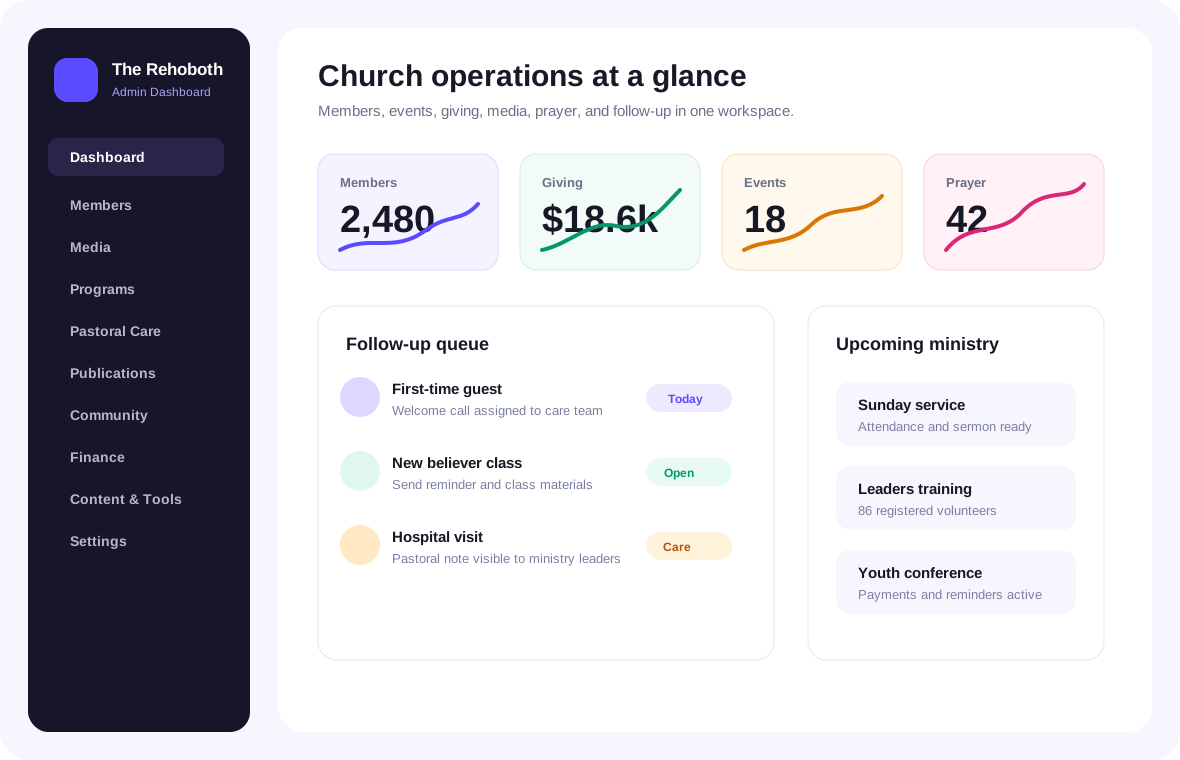
The dashboard is the daily command center for church operations. It brings ministry activity, giving, events, members, storage, prayer, and recent items into one place.
Review member totals, sermon counts, event activity, donations, prayer requests, balance, and storage usage. Use these numbers to spot operational changes quickly.
Use recent sermons, upcoming events, and prayer items to confirm that public ministry content and care tasks are current.
Branch users see information relevant to their branch. Central admins can use branch-level views to compare activity and support local teams.
Open the related module from each dashboard card to add records, update content, follow up, or review deeper reports.
These modules hold the people and operating structure of the church: members, users, branches, churches, categories, and storage.
Add and manage member profiles, contact information, household details, branch assignment, directory visibility, and care context. Use search and filters to find people quickly.
Create dashboard users for staff and volunteers. Assign roles based on actual responsibility so finance, ministry, community, and admin work stays separated.
Manage branch locations, local leadership, contact information, and branch-level ministry context. Use branch scope to keep local work organized.
Create reusable categories for content, events, media, publications, and other organized records so filtering stays consistent.
Monitor file usage across images, media, documents, books, and uploads. Review storage before large uploads or media-heavy campaigns.
Super admin users can manage church records across the platform, inspect church details, and support tenant-level configuration.
Ministry tools help teams publish teaching, run programs, care for people, and keep spiritual formation resources organized.
Create sermon records with title, speaker, date, category, audio, video, notes, and cover image. Use YouTube import where configured, then review details before publishing.
Create photo albums for events, services, conferences, outreach, and church life. Add clear album titles, cover images, and relevant descriptions.
Configure livestream entries for live services, special meetings, and conferences. Include schedule details and stream links so members can join from the app.
Publish radio streams, podcast shows, and podcast episodes. Keep descriptions, artwork, episode order, and availability current.
Create events with date, location, branch, registration settings, payment requirements, capacity, reminders, and follow-up context.
Publish weekly church activities such as Bible study, prayer meetings, choir rehearsals, service times, and recurring ministry programs.
Create groups, assign leaders, manage members, and use group membership to support discipleship, pastoral care, and communication.
Review prayer requests, respond pastorally, and publish testimonies where appropriate. Keep sensitive prayer details visible only to the right people.
Publish articles, books, devotionals, lyrics, bulletins, and Bible-related content. Use categories and clear titles so members can find resources.
Manage available Bible versions for the app. Members can read, search, bookmark, highlight, compare, and take notes depending on app configuration.
Community tools help the church communicate clearly, gather member responses, and support interaction inside the church app.
Publish church-wide or branch-specific announcements. Use concise titles, clear dates, and direct calls to action.
Manage community posts, moderation needs, and public-facing updates that keep members connected between services.
Send targeted SMS, email, or other supported message types to members, groups, branches, event registrants, or custom segments.
Use notifications for timely app updates, reminders, event notices, prayer prompts, and important church messages.
Support direct and group conversations for ministry teams or members. Use moderation and permissions according to church policy.
Review volunteer applications, manage serving interests, and connect people to ministry teams for follow-up and scheduling.
Finance tools help churches manage giving records, campaigns, accounts, transactions, paid content, and billing responsibilities with the right access controls.
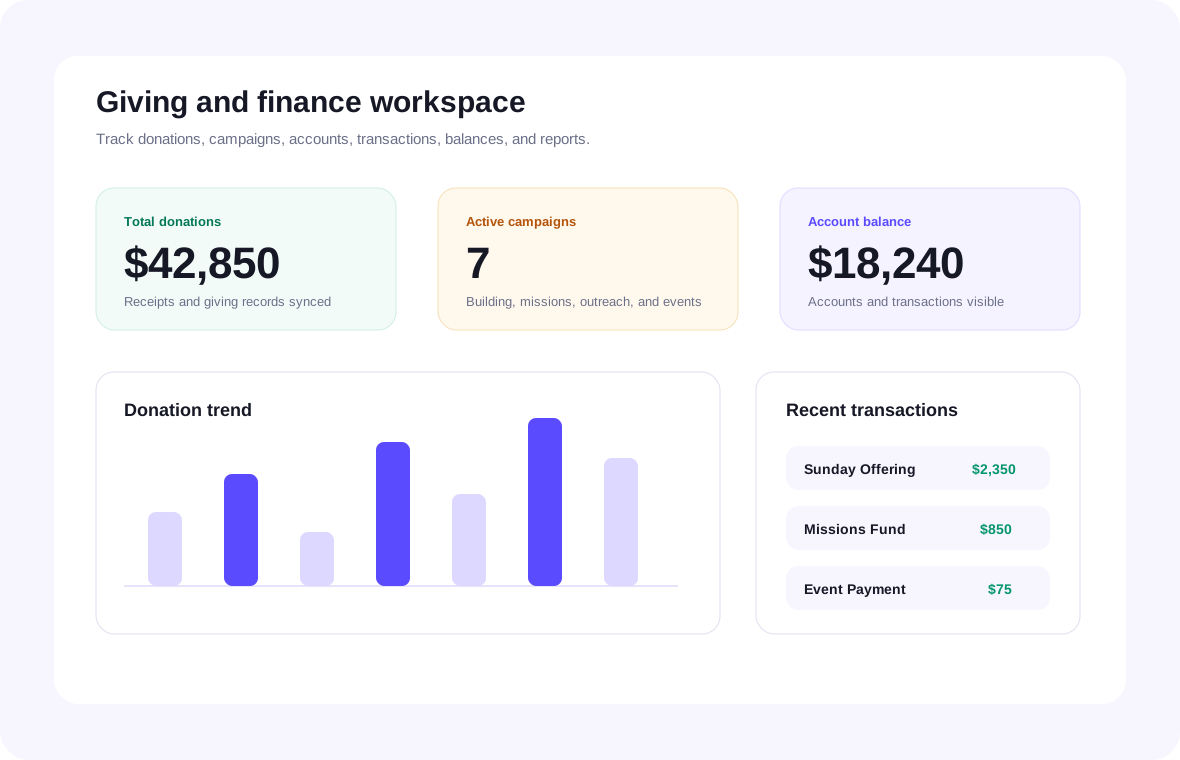
Review giving records by member, amount, fund, branch, payment method, date, and status. Use exports for finance review and reconciliation.
Create campaigns for missions, building funds, outreach, benevolence, events, or special projects. Add descriptions, goals, dates, and visibility settings.
Track finance accounts, balances, and transaction history. Keep records structured so finance reporting is consistent.
Use monetization summaries to review paid resources or media where enabled for the church.
Admins can review the active subscription, plan details, limits, invoices or billing-related account status from the Billing and Settings plan areas.
Give finance access only to users who need it. Avoid exposing donation and account details through general ministry roles.
The Rehoboth includes tools for shaping the member-facing mobile app and public church presence without editing code.
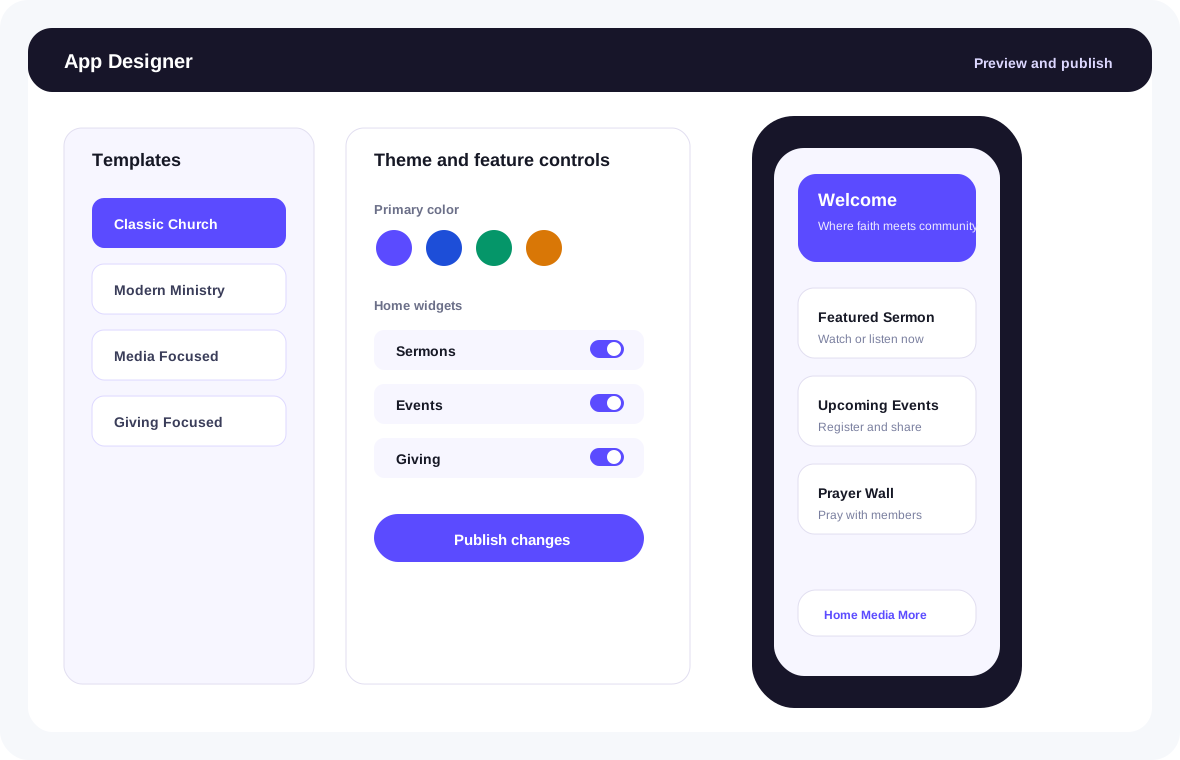
Select templates such as Classic Church, Modern Ministry, Media Focused, Giving Focused, Youth/Vibrant, or Minimal Elegant. Adjust theme colors, widgets, layout emphasis, and feature visibility.
Customize mobile app labels, headings, buttons, empty states, tab names, and common messages from a searchable text registry.
Manage app imagery such as hero images, covers, icons, and branded visual assets used by mobile screens.
Turn mobile app modules on or off, including sermons, podcasts, livestream, radio, photos, devotionals, articles, books, Bible reader, lyrics, groups, prayer, testimonies, chat, members, events, giving, announcements, notifications, bulletins, activities, membership, volunteer, AI assistant, and FAQs.
Build or update the church website experience using the dashboard builder. Keep public-facing details aligned with events, media, giving, and contact information.
Create or assist with church content drafts such as announcements, devotionals, event copy, sermon summaries, social posts, and communication templates where AI is configured.
The mobile church app gives members a branded way to follow church life, consume media, give, pray, connect, and manage their own profile.
Members see service times, featured sermon, upcoming events, today's devotional, announcements, church life sections, quick actions, birthdays, branches, and configured widgets.
Members can browse sermons, listen or watch, open podcasts, join livestreams, listen to radio, view photos, and save or revisit media.
Members can read devotionals, articles, books, Bible content, hymns, song lyrics, and bulletins that the church publishes.
The Bible reader supports versions, books, chapters, search, bookmarks, highlights, notes, comparison, and verse image creation where configured.
Members can use community feed, groups, chat, prayer, testimonies, leadership, contact forms, membership forms, and volunteer forms.
Members can access events, calendar, birthdays, branches, downloads, giving, notifications, saved items, profile, settings, help, privacy, terms, and Ask AI where enabled.
Settings bring together church configuration, account preferences, integrations, domain setup, billing plan details, and operational data tools.
Keep church name, contact details, location, branding, service information, and public-facing identity accurate.
Configure sender name, sender email, domain verification, DNS records, bounce status, complaints, and suppression list handling where supported.
Add the required API keys and settings so sermons or videos can be imported into the media workflow.
Set the map API key so branch and location features can display maps correctly where used.
Add and manage the AI key used for AI Church Content or app AI assistant capabilities. Remove keys that are no longer used.
Import members or other structured records when onboarding an existing church database. Clean the file first, map fields carefully, and review results after import.
Export church data for reporting, review, backup, or migration according to the access allowed for the user role.
Review file usage, plan limits, and large uploads so media-heavy churches can manage capacity responsibly.
Super admin tools are for managing the platform across churches, plans, subscriptions, billing, usage, revenue, messaging, storage, domains, logs, tickets, Bible versions, and system settings.
View church tenants, inspect church details, manage branches, and support church-level configuration.
Manage platform admin users, church subscriptions, plan status, and account access.
Configure monetization products, feature entitlements, billing behavior, and usage limits.
Manage messaging providers, pricing rules, and communication service configuration.
Review AI usage, pricing settings, and provider status for platform operations.
Manage storage, domains, audit logs, tickets, Bible versions, revenue views, and system settings.
Use these workflows as practical operating patterns for common church tasks.
Open Members, create the profile, assign branch and household details, confirm contact information, and connect the member to groups, serving teams, or follow-up where needed.
Open Sermons, add title, speaker, date, category, media link or upload, notes, and cover image. Review the public display, then publish to the app.
Open Events, add schedule, branch, venue, description, capacity, payment settings, and reminder details. Publish, monitor registrations, record attendance, and assign follow-up after the event.
Choose the right audience, write a short message, select the correct channel, preview the content, send, and review delivery status or responses.
Open Giving Campaigns, create the campaign, set the goal and dates, add a clear description, publish it to giving channels, and review donations from the finance dashboard.
Open App Designer, choose a template, update colors and widgets, adjust App Texts and App Images, enable only the features the church will use, preview, then publish.